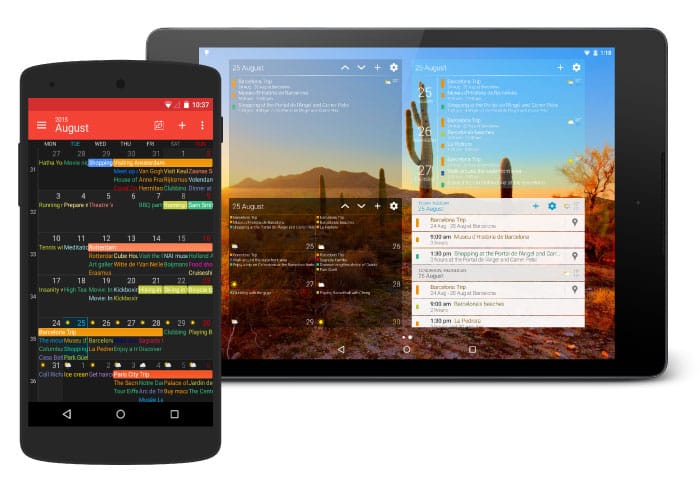
Business Calendar 2 PlannerIntro: Business Calendar 2 Planner is a productivity calendar and task organizer for Android users who need one place for work, family, and personal commitments. It combines monthly, weekly, daily, yearly, and agenda views with quick event creation, flexible repeats, reminders, attachments, and contact links. You can move or copy several appointments, postpone tasks, color-code entries, and keep a clearer schedule with widgets and themes. Synchronization with Google, Outlook, CalDAV, and task services supports connected routines, while local planning keeps the app useful for simpler offline organization.
YPT - YeolpumtaIntro: YPT - Yeolpumta is a study-timer and productivity app for students preparing for exams, certifications, or long self-directed courses. It lets you record study time by subject, keep daily tasks nearby, and build a clearer routine around focused sessions. Study groups, shared status, and category rankings add gentle accountability when you prefer learning with friends or peers. Calendar and chart views turn accumulated sessions into a visual record, while Wear OS support can extend timing to compatible Galaxy Watch devices. The result is a practical way to make steady progress visible and easier to maintain.
TimeTreeIntro: TimeTree is a shared calendar and schedule planner built for families, couples, friends, and teams that coordinate time together. Members can create shared calendars, add color-coded events, and keep up with changes through reminders and activity updates. Event pages support comments and photos, while memo and to-do areas hold plans that do not yet have a fixed date. Multiple calendars help separate home, work, and group schedules, and web access keeps plans available beyond a phone. The result is a practical hub for organizing commitments without repeated message threads.
TodoistIntro: Todoist is a task manager and personal planner that helps people turn loose ideas into organized actions. You can capture tasks quickly, assign dates and priorities, and sort work across Inbox, Today, and Upcoming views. Projects, sections, labels, filters, and recurring schedules keep both one-off errands and longer plans manageable, while reminders help important commitments stay visible. With synced access across phones, tablets, browsers, and desktop apps, Todoist gives individuals and teams a clear place to plan work, routines, and everyday life.
Notion CalendarIntro: Notion Calendar is a productivity calendar for Android users who want work, personal, and project dates in one view. It connects Google Calendar and Apple iCloud calendars with Notion pages, database items, and timelines, helping you see meetings and deadlines together. The mobile experience focuses on a compact one-, two-, or three-day schedule, quick event creation, and home-screen widgets for upcoming commitments. Time-zone tools, meeting links, and a clean account-based workspace make it useful for busy teams, freelancers, and students who need a clearer daily plan without switching between separate calendars.
Hizo: Habit Tracker & TodoIntro: Hizo is a calm productivity app for people who want to build steady habits and keep everyday tasks in one place. You can create routines, mark progress in a notebook-like tracker, and use a simple to-do list to plan what needs attention today. Daily notes and clear statistics help you reflect on consistency instead of relying on memory alone. Widgets, reminders, colors, themes, and language options make the system easier to fit around your routine. It is designed for small, repeatable actions that turn intentions into sustainable habits.
Forest: Focus for ProductivityIntro: Forest: Focus for Productivity is a productivity timer that turns focused work into a growing digital forest. Students, remote workers, and anyone trying to spend less time on distracting apps can plant a seed, choose a focus period, and keep working while the tree develops. Leaving the session early can leave a withered tree, while completed sessions add visible progress to the forest. Focus history, tree choices, and optional group sessions give the routine a gentle sense of momentum, helping everyday study, writing, exercise, or planning feel easier to start and repeat.
Focus TreeIntro: Focus Tree is a study and productivity app that turns focused work into a calmer daily routine. Students can start a timed focus session, use a Pomodoro-style countdown, and block distracting apps while they study. The app also brings flashcard learning into the same workflow, with spaced repetition and a Quizlet deck-link import path for building review material. Shared gardens, earned items, friend invitations, and study streaks add a gentle social layer, helping classmates stay accountable and make steady progress without losing sight of the next study task.
Focus FriendIntro: Focus Friend is a cozy productivity app that turns work, study, and everyday chores into a gentle focus ritual. Set a timer and your Bean works alongside you, building something while you stay with the task. Completing a session earns socks and other rewards that can furnish a playful room, while Bean skins and accessories add personal style. Break timers support Pomodoro-style routines, and Deep Focus can limit distracting apps during a session. It is a friendly way to make concentration feel more visible, motivating, and rewarding.
FlofocusIntro: Flofocus is a Pomodoro productivity app for students, professionals, and anyone who wants a calmer way to work. It turns a focus block into a simple routine: add a task, choose a timer, and stay with one clear session before taking a deliberate break. A bright 25-minute timer, progress markers, ambient sound choices, and gentle illustrations make the workflow approachable, while statistics and customizable settings help you shape longer study or work habits. Use it for reading, revision, writing, planning, or short deep-work sprints when distractions start to win.
eCalendar - Daily PlannerIntro: eCalendar - Daily Planner is a family scheduling app for coordinating events, chores, lists, and everyday routines in one shared workspace. Parents and household members can add calendar entries, assign recurring tasks, and track completion with a clearer view of who needs to do what. Custom categories and colors help separate people or activities, while calendar synchronization can bring Google, Apple, and Outlook schedules together. Lists support to-dos and groceries, and the companion service adds meals, reminders, and reward planning for families that want practical structure throughout the week.
DigiCal Calendar AgendaIntro: DigiCal Calendar Agenda is a customizable Android calendar and daily planning app for people who need a clearer view of busy schedules. It brings Google Calendar, Outlook, and Exchange events into one agenda, then lets you switch between day, week, month, text-month, and other layouts. Color coding, light or dark themes, widgets, weather details, location search, reminders, and map shortcuts help turn appointments into an actionable plan. Whether you are organizing work, travel, family commitments, or recurring routines, DigiCal keeps the next task visible and makes schedule changes easier to manage.
ClockifyIntro: Clockify is a time-tracking app for recording work sessions, organizing entries, and supporting project-based routines. You can start a timer, add time manually, log breaks, and switch to a Pomodoro view. Its setup flow highlights client billing, project budgets, payroll, progress tracking, and kiosk clock-in or clock-out scenarios. Settings include time-tracking reminders, calendar options, theme and language choices, and a forced offline mode. It suits freelancers, teams, and managers who want a mobile place to keep work time organized before reviewing or submitting it.