Intro: TuneIn Radio is a live audio streaming app for listeners who want radio, sports, music, news, podcasts, and audiobooks in one place. Users can browse stations from around the world, open themed music channels, follow live play-by-play, or choose on-demand shows for commuting, workouts, and time at home. Search and category browsing make it easier to move from local radio to global programming, while favorites and personalized suggestions help organize repeat listening. Connected-device support also lets the same audio routine fit phones, speakers, cars, and other compatible screens.
Intro: SoundCloud is a music discovery and streaming app built around tracks, DJ sets, remixes, and emerging artists that may not appear in ordinary chart feeds. Listeners choose artists they like, then browse personalized mixes, related tracks, genre pages, stations, and a mobile preview feed. Likes, playlists, albums, followed creators, and recent stations stay organized in the Library, while a transfer entry helps users bring selections from other music services. The Android app suits listeners who want to explore new scenes, follow creators, and keep a personal collection close at hand.
Intro: Rumble is a video and live-streaming app for viewers who want to follow creators, browse short clips, and watch shows across news, politics, podcasts, gaming, sports, and culture. You can move between on-demand videos, live streams, Shorts, and creator channels while keeping discovery focused on voices you choose to follow. The app also gives creators a path to build channels, host video, stream live, and explore monetization tools. With optional signed-out access at launch, Rumble suits casual viewing as well as regular creator communities.
Intro: YouTube is Google's official video app for watching, discovering, subscribing to, creating, and sharing videos across music, gaming, news, learning, Shorts, live streams, and creator channels.
Intro: Tubi is a free, ad-supported streaming app for Android users who want movies, TV shows, live-style channels, and on-demand entertainment without building a local media library. Users can browse categories, start watching supported content, and optionally use account features for a more personalized experience. The app fits viewers who prefer a large catalog funded by ads rather than a traditional subscription-first model. Access can still depend on region, network quality, content rights, and whether the user chooses to sign in.
Intro: Crunchyroll is an anime streaming app for viewers who want new episodes, classic series, and anime movies in one mobile library. Browse action, romance, fantasy, comedy, and slice-of-life titles, then choose available subtitle or dub languages for a more personal watch. You can organize favorites with Crunchylists, follow personalized recommendations, and keep track of shows across profiles. Eligible plans also support episode downloads for offline viewing, while playback settings, casting, and picture-in-picture help fit anime into commutes, travel, and everyday viewing.
Intro: HBO Max is a streaming app for Android users who want TV and movie access, device sign-in, QR-code pairing, account entry, and big-screen style playback from a phone or compatible Android display. It is aimed at viewers who follow premium series, films, sports specials, and subscription entertainment under one profile. The app opened through a leanback-style interface to landing, get-started, and sign-in screens. Users should review subscription requirements, account credentials, notifications, storage, mobile data, background behavior, and device compatibility before regular streaming.
Intro: Netflix is a streaming video app for Android users who want subscription-based movies, series, downloads, profiles, recommendations, and account-managed playback on mobile devices. It is aimed at users with a Netflix account or those starting sign-up from a phone. The captured package reached a signup/native activity, but the media area did not allow screenshots, so only settings and protected-screen evidence are available. Its settings show camera, microphone, nearby devices, notifications, picture-in-picture, storage, and network behavior, making account access and media permissions the key review points.
Intro: VLC for Android is a free, open-source media player for videos, music, network streams, subtitles, and shared storage. It is built for users who want broad format support, playback controls, and a familiar media library without account requirements.
Intro: Audiomack is an Android app for people looking for music and media from a mobile device. It provides a focused experience that users can explore at their own pace, whether they are getting started, returning to a familiar activity, or choosing settings that suit their routine. The app can be useful when a phone is the most convenient place to access its main functions without switching between several services. Users should review available settings, permissions, network use, and any account or payment choices before relying on features that handle personal information or connected content.
Intro: MX Player is a video player for Android users who want local media playback, subtitle support, hardware acceleration, gesture controls, and a flexible viewing experience for downloaded or stored videos. The app is known for handling many file types and playback situations, including large videos and subtitle-heavy content. The ad-supported package also declares broad permissions for storage, overlay, location, notifications, advertising, billing, and related services. It suits users who want a capable media player but are willing to review privacy and monetization prompts carefully.
Intro: Kodi is a media center for Android users who want to organize local video, music, pictures, and compatible media sources through a TV-style interface. It suits people who prefer managing their own libraries, add-ons, and playback settings rather than using one fixed streaming catalog. The captured build opened to Kodi after an Android compatibility notice and media-file permission handling. Users can organize media and should review source setup, add-ons, storage access, network shares, and device controls before building a library.
Intro: Google TV is an entertainment hub for Android users who want movie and show discovery, watchlist management, library access, recommendations, and TV connection controls. It is aimed at viewers who use Google media services and want streaming choices organized across apps. The app opened to welcome, recommendation preferences, loading tabs, watchlist, library, downloaded filter, and connect-TV controls. Users should review Google account expectations, purchases or rentals, contacts, location, microphone, nearby devices, notifications, picture-in-picture, and background media behavior before use.
Intro: VK Video is a television-focused streaming app for browsing films, series, creator uploads, live channels, sports events, music, news, and family content on a large Android screen. The home layout presents recommendations and trending videos in remote-friendly rows, while built-in search helps viewers find specific programs without navigating a phone interface. Signing in adds personal areas for watch history, playlists, saved uploads, and followed communities or creators. With supported content available at up to 4K and account-based viewing across devices, the app brings VK's broad video catalog into a living-room format.
Intro: iQIYI - Drama, Anime, Show is a streaming app for Asian dramas, anime, movies, variety shows, and short-form series. It helps viewers discover new titles through recommendations, genre and region filters, and a searchable library, then watch with multiple subtitle and language options. The app also provides a personal list, viewing history, downloads, and cross-device continuity for users who move between phone, tablet, or TV. Free viewing, VIP access, and compact short dramas make it practical for both quick sessions and longer viewing.
Intro: ITVX is a streaming app for Android users who want ITV channels, live TV, on-demand shows, drama, films, sport, kids content, and personalized watch lists from a phone. It is aimed at viewers in supported regions who use ITV accounts and want mobile access to entertainment and live broadcasts. The app shows cookie choices, notification prompts, home rows, live channel listings, drama shelves, signed-in account state, reminders, downloads, search areas, and streaming categories. Users should review account requirements, regional access, ads, notifications, storage, mobile data, and playback behavior.
Intro: BBC iPlayer is a streaming app for watching BBC television, live channels, news, sport, music, documentaries, drama, and comedy on Android. Viewers can browse on-demand series, pause or rewind supported live broadcasts, and save eligible programmes for offline viewing. A watchlist, recommendations, child profiles, and Chromecast support make it easier to organise viewing across everyday situations. Sign-in can connect viewing progress between devices, while download availability and programme access depend on rights, account, location, and device conditions. It suits viewers who want BBC content in one focused mobile experience.
Intro: Peacock TV is NBCUniversal's streaming app for viewers who want shows, movies, live sports, news, and always-on channels in one place. Users can browse Peacock Originals, current NBC and Bravo series, Telemundo programs, family entertainment, and major film collections. Live sections bring selected sports and events alongside news coverage, while profiles help households keep viewing choices separate. Premium Plus members can also download eligible titles on supported phones and tablets. The Android app suits people who want a broad entertainment library with both scheduled and on-demand viewing.
Intro: Hulu is a streaming app for watching TV shows, movies, originals, and live or on-demand entertainment through an account-based service. Android users can browse the welcome flow, sign in, continue watching, search for content, and use playback features tied to their subscription and region. The app is useful for people who already use Hulu or want a mobile viewing option alongside living-room devices. Full streaming access depends on account status, plan availability, location rules, and the service catalog available to the user.
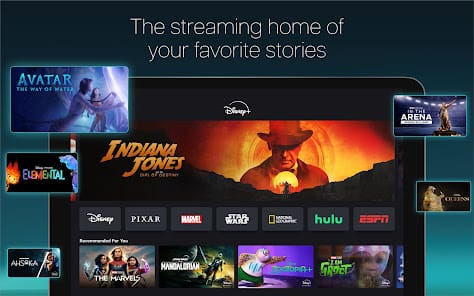
Intro: Disney+ is a subscription streaming app for watching movies, series, Originals, and selected live programming on Android. It brings stories from Disney, Pixar, Marvel, Star Wars, and National Geographic into a single browsing experience, with additional Hulu and ESPN hubs available in supported plans or regions. Viewers can explore new releases, classic films, past seasons, and curated streams, then use profiles and parental controls to tailor access for different household members. Eligible plans also support downloads for offline viewing, making Disney+ useful for family nights, travel, and everyday entertainment.