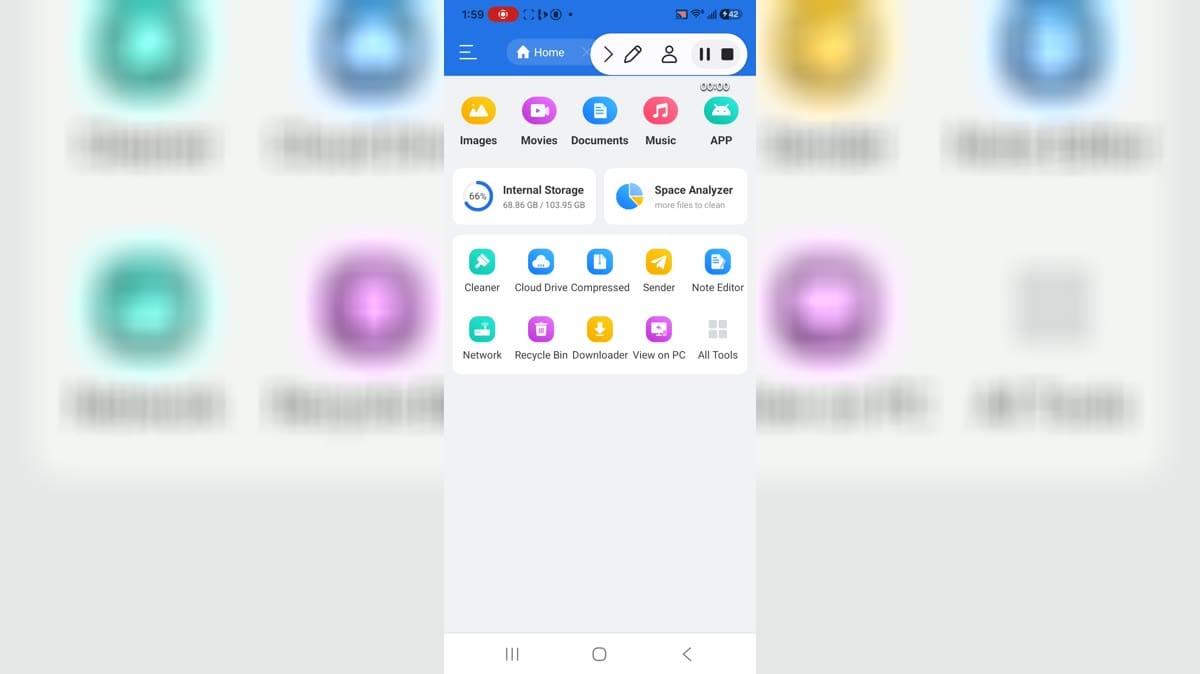
RS File ManagerIntro: RS File Manager is an Android file-management app for people who want one place to organize device storage, media, documents, and app files. Its home dashboard groups images, videos, audio, documents, compressed archives, and APKs while showing internal-storage usage at a glance. You can search, copy, move, rename, share, compress, or unpack files, then connect to cloud drives, LAN folders, FTP, Bluetooth, or WebDAV when needed. Built-in tools such as Space Analyzer, Recent, Recycle Bin, bookmarks, and encrypted storage make everyday cleanup and file access easier.
ZArchiverIntro: ZArchiver is a file and archive manager for Android users who need to browse local folders, create archives, extract compressed files, organize storage, and adjust file views from one lightweight interface. The app opens around internal storage navigation, folder lists, sorting controls, multi-select tools, create actions, settings, and an about panel. Version 1.0.10 improves file operations, adds SUI support, adds an E-Ink theme, and supports drag-and-drop in or out of the app. It suits users who manage downloaded files, backups, and archives directly on their device.
X-plore File ManagerIntro: X-plore File Manager is an Android file-management app for people who want to browse folders, move files, inspect storage, and manage local content from a dual-pane style interface. It suits users who need more control than a basic downloads view provides. The package includes file-management screens and Android storage controls in its evidence. Users should review storage permissions, connected locations, file operations, and any sensitive folders before using it for regular organization or transfers.
Total CommanderIntro: Total Commander is an Android file manager for people who want to browse device storage, organize folders, and handle documents, downloads, and media without moving first to a computer. It is useful for routine cleanup, locating saved files, and moving content between available locations. The app focuses on file browsing, folder management, transfers, and storage access from a mobile interface. Users can review folders before acting, choose destinations carefully, and decide which permissions or connected locations are appropriate for their own files and device setup.
Solid ExplorerIntro: Solid Explorer is an Android file manager for users who want to browse device storage, organize folders, and work with local or connected files from a polished two-panel interface. It is useful for handling downloads, documents, media, and transfers without relying on a desktop computer. The app focuses on file browsing, copying, moving, renaming, archive support, and storage connections. Users can tailor access to the folders and services they manage, making it a practical choice for people who want more control over their everyday Android files.
RARIntro: RAR is an Android archive manager for people who need to browse files, create or extract archives, and organize compressed downloads on a phone. It suits users who regularly work with ZIP, RAR, and similar file packages without moving first to a computer. The app includes a file-management interface and archive-related actions, while Android storage access is important for working with folders outside its own app space. Users should review all-files access, storage locations, archive contents, and optional purchase terms before using it for sensitive files.
Files by GoogleIntro: Files by Google is a file manager and cleanup app for Android users who want categories, downloads, images, videos, audio, documents, apps, safe folder, storage browsing, junk cleanup, search settings, and internal storage navigation from a phone. It is aimed at users who need simple file organization and storage cleanup without a complex desktop-style manager. The app shows category tiles, clean page, trash, settings, other storage, internal folders, images view, hidden files controls, notification settings, permissions, storage, and data usage. Users should review file access, photos and videos permission, safe folder privacy, cleanup suggestions, install-unknown-apps controls, storage, and mobile data.
File Manager PlusIntro: File Manager Plus is an Android file manager for users who want to browse storage, organize downloads, manage media, and connect files across a phone, NAS, cloud account, or network location. Its home screen groups common areas such as main storage, images, audio, videos, documents, apps, and new files so a task can begin from a clear category. Users can open, search, copy, move, rename, compress, decompress, download, bookmark, and share files. It suits everyday storage control, cleanup, and practical file transfer.
Amaze File ManagerIntro: Amaze File Manager is an Android file manager for people who want to browse device storage, organize folders, and handle documents, downloads, and media without moving first to a computer. It is useful for routine cleanup, locating saved files, and moving content between available locations. The app focuses on file browsing, folder management, transfers, and storage access from a mobile interface. Users can review folders before acting, choose destinations carefully, and decide which permissions or connected locations are appropriate for their own files and device setup.
FX File ExplorerIntro: FX File Explorer is an Android file manager for people who want to browse device storage, organize folders, and handle documents, downloads, and media without moving first to a computer. It is useful for routine cleanup, locating saved files, and moving content between available locations. The app focuses on file browsing, folder management, transfers, and storage access from a mobile interface. Users can review folders before acting, choose destinations carefully, and decide which permissions or connected locations are appropriate for their own files and device setup.
File CommanderIntro: File Commander is an Android file manager for people who want to browse device storage, organize folders, and handle documents, downloads, and media without moving first to a computer. It is useful for routine cleanup, locating saved files, and moving content between available locations. The app focuses on file browsing, folder management, transfers, and storage access from a mobile interface. Users can review folders before acting, choose destinations carefully, and decide which permissions or connected locations are appropriate for their own files and device setup.
ES File ExplorerIntro: ES File Explorer is a file-management app for Android users who want to browse folders, move or copy files, manage storage, inspect media, and handle local APK or archive tasks from one interface. It is designed for users who need more control than a basic gallery or downloads view, especially when cleaning folders, locating large files, or organizing device storage. The package declares broad storage, package-management, camera, location, phone-state, account, and ad-related permissions, so users should review access carefully before using it with personal files.