
How to choose a Photography APK
Check the app name, package name, latest version, file size, update date, source notes, SHA-256, and whether the download page includes clear safety context.
Browse Photography APKs for Android with latest versions, file sizes, package details, scan notes, and verified download links.

Filter Cam for WA Video Call is a photography app for adding playful or polished effects to WhatsApp-style video chats. It gives callers a simple home screen for Video Call, Beauty Looks, Beauty Camera, Essentials, and Help Center tools. Users can browse themed effects, smooth or reshape a face, apply filters and stickers, and change the background before or during a call. Real-time controls make it easy to adjust a look without leaving the camera view. It suits social callers who want more expressive self-presentation and a lighter, more creative video-chat routine on Android.
10.0

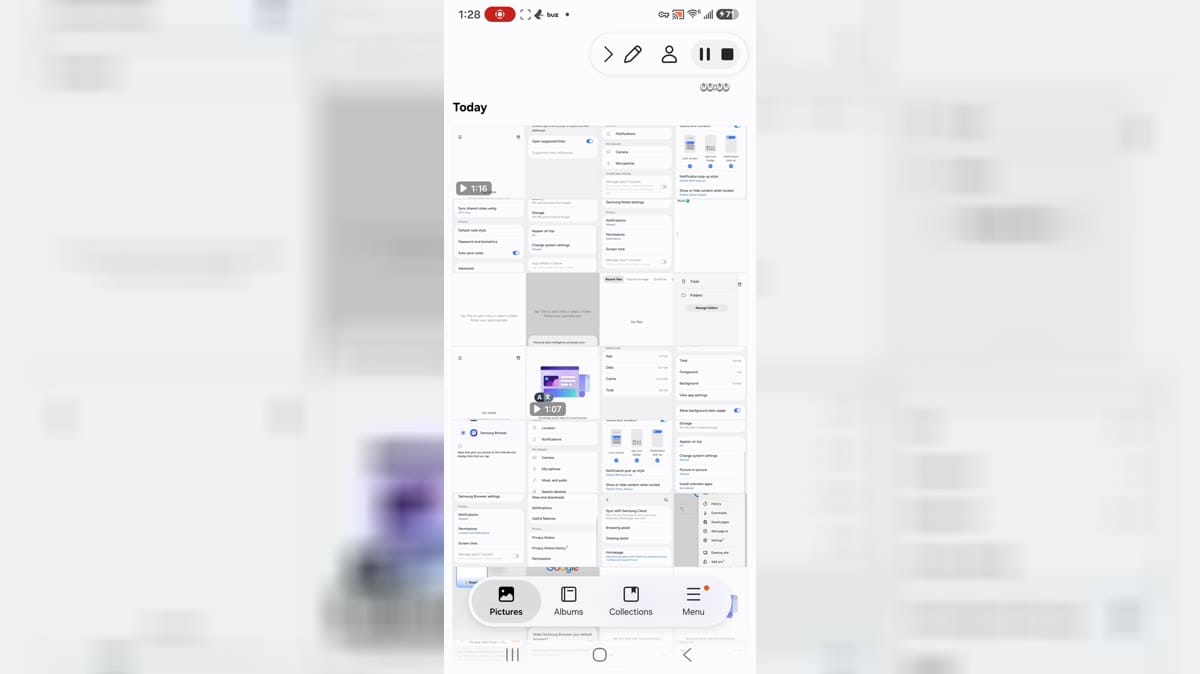
Samsung Gallery 3D is Samsung's gallery app for Android users who want photo albums, stories, collections, documents, media categories, editing actions, and cloud-related gallery settings. It is aimed at Samsung device users who organize screenshots, camera images, videos, and personal albums. The app shows Today, Pictures, Albums, Collections, Stories, document groups, edit collections, favorite, video, secure album, trash, settings, sync, motion photo, and auto story controls. Users should review media permissions, cloud sync, notifications, storage, system-setting access, and private photo handling.
10.0

Photify AI is an AI photo and video generator for people who want to turn a selfie into a more expressive visual identity. Upload one image, choose a style or describe an idea, and create polished portraits, playful transformations, or imaginative scenes. The app suits profile headshots, dating photos, creative experiments, and quick visual concepts, with an extensive style library and rapid generation designed for short sessions. Photo and video tools let you explore different looks without rebuilding every image from scratch.
9.9

Picture Keeper Connect is a photo-backup and memory-management app for Android phones and tablets that works with a Picture Keeper drive. It helps families move photos, videos, contacts, and other important files off a crowded device, then view, organize, and share them from the connected storage. Photo Scanner digitizes printed memories, while tools such as Magic Erase, Retouch, Colorize, and Find a Photo add practical ways to improve or locate images. The result is a simpler routine for preserving memories, freeing phone space, and carrying a personal archive between devices.
9.9

Facetune is an AI-powered photo and video editor for people who want polished selfies, portraits, and social-ready content without a complicated desktop workflow. Start with a quick retouch, explore new hairstyles and makeup looks, or refine a picture manually when you want more control. The app also brings together video touch-ups, background effects, headshot creation, and a dedicated Photoshoot area. Its guided starting choices make it easy to begin with a specific visual goal, then move into more detailed editing as your ideas develop.
9.9

Deepswap – AI Face Swap is an Android gateway to an online face-editing service for people who want to rework photos, videos, and GIFs without a desktop editor. Users can upload an original file, choose a replacement face, and download the processed result through a guided three-step flow. The interface also links to video generation, VR face swap, background removal, image enhancement, and an AI photo generator. Its mobile layout keeps creation tools, pricing, support, and account access in one menu, making quick social edits and playful visual experiments easier to manage from a phone.
9.9

Unfold is a mobile social-content creation app for turning photos and video clips into polished stories, posts, and Reels. Creators can start with hundreds of ready-made templates, add text and media, and refine the result with fonts, filters, effects, and AI background removal. Feed Planner helps preview how posts work together on Instagram, while Bio Sites gathers important links in one shareable destination. Optional Plus and Pro tools add broader design resources and brand controls, making Unfold useful for creators, freelancers, and small teams building a consistent social presence from an Android phone.
9.4

Moving Pictures & 3D pictures is a photography and motion-editing app for turning still images into lively visual pieces. It lets creators animate selected parts of a photo, add overlays, stickers, camera effects, and filters, then shape the result into a moving picture, loop, or short video. The Projects area keeps creations together, while Discover offers starting points such as Animate and Sky for users who want inspiration before editing. Users can also create live wallpapers and moving backgrounds for a phone or lock screen. It is a flexible choice for social posts, personal artwork, and quick visual experiments.
8.3

EPIK is an AI-assisted photo and video editor for creators who want to turn ordinary media into polished visual posts. Start with a photo or clip, then use enhancement, portrait retouching, smart cutouts, object removal, filters, text, stickers, collages, or video effects to shape the result. Professional controls such as HSL, curves, crop, perspective, and batch editing give more deliberate projects extra control, while templates provide quick starting points. It suits social content, profile images, memory collages, and everyday mobile editing.
9.6

PicMa is an AI photo and video creation app for people who want to refresh everyday pictures or turn memories into lively visual stories. Choose a portrait, pet photo, old print, or short clip, then use one-tap enhancement, restoration, colorization, object removal, or creative styling to shape a cleaner result. PicMa can also animate still images, create AI hug and kiss videos, and improve video clarity. With simple editing tools alongside its AI effects, it suits social posts, family keepsakes, and quick experiments when you want expressive results without a long manual workflow.
9.7

Chatbooks is a mobile photo-book creation app that turns pictures from your phone into printed keepsakes. It helps families, parents, travelers, and gift makers choose a book style, select camera-roll photos, and shape everyday moments or special occasions into a finished project. The app presents recurring Monthbooks alongside one-time books, with options for covers, captions, collages, and book details. Its guided flow keeps photo selection and printing approachable, making it easier to move favorite images off a phone and into physical books that can be revisited and shared.
7.3

Reface is a mobile AI photo and video creator for turning personal images into playful visual edits. Users can place a face into a photo or video, build stylized avatars and headshots, animate a portrait, or explore a different hairstyle before saving a look. The guided opening flow presents clear paths for AI Photo & Avatar and Hairstyles, while the wider toolkit adds filters, enhancement, and shareable formats. It suits quick profile-picture experiments, social posts, greetings, and creative makeovers when you want polished results without a complex desktop editor.
9.4

DarkTable Photo Editor is a dark-themed Android photography app for quick, everyday image editing. It gives casual creators a single place to choose a picture, crop it, adjust its size, compress the file, convert it to a common format, and prepare the result for sharing. Filters, enhancement tools, background options, frames, overlays, and collage-style layouts add room for creative changes when a simple correction is not enough. With no account required, the app suits social posts, profile pictures, product images, documents, and personal photos that need a practical finish.
7.3

Comica is a lightweight photo-editing app that turns pictures into comic-style images and cartoons. Choose a photo from your gallery or capture a new one with the camera, then apply a visual effect that gives the image a drawn, illustrated look. You can add speech balloons and short text to build a meme, joke, or simple comic scene before saving the result. A home screen keeps Gallery, Camera, and Multi creation paths easy to find, while Settings includes a media folder and sharing option. It suits casual creators who want quick, playful edits without a complex design workflow.
8.4

Picsart is a mobile photo and video editor for creators who want to turn everyday images and clips into social posts, collages, and polished visual ideas. Start with a photo or video, then add text, stickers, filters, effects, background removal, object cleanup, or AI-assisted changes. Templates and creative discovery tools help when you need a quick starting point, while video editing supports music, captions, and short-form projects. It suits personal edits, social content, product visuals, and small-business designs when you want flexible creation from an Android device.
8.7

Color Grab is a mobile color detection and measurement tool for designers, artists, makers, and anyone who needs a practical way to identify colors around them. Point the camera at a surface, tap the viewfinder, and read a named color with Hex, HSV, and other conversion options. You can build palettes, compare harmonies, refine a picked shade, or bring colors from photos into a reusable workspace. Reference catalogs, locking controls, white-balance settings, clipboard copying, and shareable color cards make it easier to turn a visual sample into a value you can use in design, decorating, craft, or everyday color matching.
9.5

Candy Camera AI - Find myself is a photography app for creating polished selfies and personal photo records on Android. Use one-tap templates, colorful stickers, and camera tools to shape a look that feels personal, then refine it with makeup, retouching, face-aware filters, AR fitting, and hair options. Beyond photo styling, the app adds quizzes and more than 1,500 leisure activities for exploring tastes and inner thoughts, plus daily fortune content across 16 categories. It brings creative editing and light self-discovery into one playful camera experience.
8.7

Quickpic Gallery Photo & Video is an Android gallery and media organizer for people who want a quicker way to browse, sort, and manage photos and videos on one device. It brings albums, folders, favorites, timelines, slideshows, and file actions such as copying, moving, renaming, hiding, and deleting into a single workflow. Basic editing tools handle cropping, rotation, resizing, filters, text, and stickers, while private folders can be protected with a PIN, pattern, or fingerprint. Offline browsing and a recycle bin make everyday photo management more flexible.
8.0

Luminar: Photo Editor is an AI-powered photo editor for mobile photographers and creators who want polished images on Android phones, tablets, or Chromebooks. Users can bring in everyday pictures or supported RAW files, then adjust light, color, composition, and detail with touch-friendly controls. EnhanceAI streamlines basic corrections, while SkyAI, RelightAI, and portrait tools handle targeted changes such as sky replacement, depth-aware exposure, and natural retouching. Cropping, filters, curves, object removal, and export tools support quick social posts as well as careful creative work, combining guided automation with room for manual control.
8.3

Vaulty is a privacy-focused photo and video vault for Android users who want a separate place for personal media. It lets you move selected pictures and videos out of the main gallery, organize them in private albums, and return them when needed. A PIN, supported biometric unlock, app-disguise options, decoy vaults, and an intruder alert add different layers of control, while optional backup can help preserve a vault across device changes. Its dark, guided onboarding explains the private-gallery workflow clearly, making Vaulty useful for everyday discretion and personal document storage.
9.5

Bigjpg Picture Enlarger is an AI image-upscaling tool for Android that helps turn small photos, illustrations, and anime artwork into larger, cleaner images. Choose an image, select the enlargement and noise-reduction treatment that fits the material, and send it through a neural-network workflow designed to rebuild lines, colors, and fine detail instead of simply stretching pixels. The service supports artwork and photos and is useful when you want a clearer image for viewing, sharing, or creative projects. It keeps the task focused on image quality rather than manual retouching.
7.1

ToonArt is a photo-editing app that turns everyday portraits and selfies into cartoon, anime, caricature, and illustrated profile images. Choose a picture from your gallery or use the selfie camera, then explore AI effects, toon filters, beauty adjustments, art styles, and background options to shape a look that feels personal. The app suits social avatars, playful couple portraits, creative experiments, and quick edits made on the go. Its one-tap transformations and share-ready results make it easy to try different visual identities without a complicated editing workflow.
9.8

Photo Key is a park-photo companion for visitors who want to keep memorable rides, attractions, and family moments in one place. After signing in, users can connect their photo account, browse images taken by PhotoKey photographers, arrange selected pictures into an online album, and save digital copies to an Android phone. The service also makes it easy to share favorite scenes with friends and relatives, while its park-focused workflow keeps ride photos and character encounters organized. It suits guests who want to enjoy the day and sort through their memories afterward.
7.6
VSCO is a photo and video editing app for creators who want a recognizable visual style without building every look from scratch. Use film-inspired presets to shape color and mood, then refine images with controls for exposure, contrast, grain, saturation, HSL, fade, and borders. The app also brings together camera effects, collage layouts, video adjustments, and a creative community for sharing work and finding inspiration. Its mix of quick presets and detailed editing gives casual photographers and more serious creators room to experiment, polish a portfolio, and keep their visual language consistent.
9.4

Snapseed is a photo editor for Android users who want camera import, photo selection, batch-style editing ideas, masking, color grading, dehaze, bloom, film looks, and export controls from a phone. It is aimed at mobile photographers and creators who prefer a focused editing workspace with professional-style tools. The app shows welcome screens, camera and add-photo entry points, media permission prompts, photo picker integration, help, feedback, appearance settings, export and share options, image sizing, format quality, and EXIF controls. Users should review camera, location, photos and videos, notifications, storage, and export privacy.
8.1

PREQUEL AI Filter Photo Editor is a creative photo and video editor for Android users who want to give everyday media a stronger visual identity. You can browse cinematic, vintage, VHS, anime, Y2K, and other aesthetic filters, then build a look with AI effects, retouching tools, text, stickers, textures, and color adjustments. The app also supports video effects, templates, and Reels-oriented editing for short-form content. It suits social creators, casual photographers, and anyone who likes turning ordinary pictures and clips into polished, mood-led posts with a few focused taps.
9.8

PicWish: AI Photo Editor is an Android photography app for turning everyday images into polished portraits, product visuals, and social-ready designs. Users can remove backgrounds, enhance blurry photos, erase unwanted objects, and refine a picture with text, logos, resizing, and layered edits. Its AI Designer adds chat-style image changes, while Product Studio organizes tools for background replacement, product retouching, and AI-generated scenes. Templates, virtual try-on ideas, old-photo restoration, and colorization broaden creative options. The result is a practical workspace for sellers, creators, and anyone who wants quick, guided photo improvements.
9.3

Photoleap: AI Photo Generator is a creative photo-editing app for turning everyday pictures into polished images, digital art, and social-ready designs. It suits casual creators, visual storytellers, and anyone who wants fast ways to improve a photo or explore a new style. AI tools can generate artwork from text, transform portraits, replace backgrounds, animate still images, and extend scenes beyond their original frame. Quick edits sit alongside deeper creative controls, making experimentation approachable while leaving room for personal, expressive results. It works equally well for daily posts, profile images, and personal projects.
7.6

Photo Editor Pro - Polish is an AI-assisted photo editing app for quick social-ready edits, collages, beauty retouching, background cleanup, and template-driven designs. It suits creators who want to move from raw photos to polished posts without switching between several editing tools.
7.4

LightX AI Photo Editor Retouch is a creative photo and video editor for Android users who want to turn ordinary images into polished social posts, portraits, and product visuals. Start with an existing photo or video, then combine AI tools with manual adjustments for background removal, color changes, filters, retouching, and layout work. You can also explore AI expansion, object replacement, generated backgrounds, and customizable templates for faster creative projects. Its mix of quick edits and deeper controls suits beginners, creators, small shops, and anyone who wants flexible visual editing on a phone.
9.2
Compare highlighted Photography APK listings with package details, file sizes, update signals, and available download links.
Check the app name, package name, latest version, file size, update date, source notes, SHA-256, and whether the download page includes clear safety context.
Before installing a Photography APK, review package identity, source notes, file verification, permissions, and install behavior.
A Photography APK should be checked by package name, version, source, SHA-256, scan notes, and install behavior before installation.