TermuxIntro: Termux is an Android terminal and Linux environment for people who want command-line tools close at hand. It opens a shell where users can run commands, manage files, install packages, and build small projects from a phone or tablet. The package workflow supports familiar tools such as Bash, Zsh, Python, Git, SSH, editors, and compilers, while keyboard shortcuts and optional external-display support make longer sessions easier to manage. It suits developers, students, administrators, and curious users who want a portable workspace for learning, scripting, and remote tasks.
AIDEIntro: AIDE is a mobile programming environment for Android users who want to learn Java, explore Android app development, and work with coding lessons directly on a phone or tablet. The opening screen offers learning paths for Java skills and Android app development, plus an expert coding entry for users who already know what they want to build. Lesson panels introduce sample code, run controls, structure guidance, and sound or voice toggles. It suits learners and developers who want a compact coding workspace on Android.
OneCompilerIntro: OneCompiler is an online coding workspace for learners, students, and developers who want to write and run programs from an Android device. It brings programming languages, databases, and web technologies into a searchable mobile catalog, so users can move from Java or Python to MySQL, HTML, and other tools without installing separate local compilers. The app also includes an AI builder for turning a plain-language idea into a small application. Account and saved-code areas help users return to earlier work, making quick practice and mobile experimentation easier to manage.
GitHubIntro: GitHub is a developer collaboration app for reviewing code, tracking issues, responding to pull requests, and managing repository notifications from Android. It helps developers and teams keep project discussions, approvals, and small fixes moving when they are away from a desktop.
VEXcode IQIntro: VEXcode IQ is a robotics coding environment for students, teachers, and VEX IQ teams who want to turn programming ideas into robot behavior. Beginners can assemble color-coded command blocks, while advancing learners can work with Python or C++ without leaving the familiar project layout. Projects can use motors, sensors, the Brain, and Controller inputs to create movement, reactions, sounds, and screen output. Built-in tutorials, examples, and searchable command help make it easier to learn concepts and troubleshoot code. The result is a practical workspace for classroom lessons, robot builds, and competition preparation.
GDevelopIntro: GDevelop is a no-code game creation and discovery app for Android users who want to build, learn, and play from a phone or tablet. Creators can start with templates, remix ready-made projects, ask the built-in AI for help, and assemble games with visual events, behaviors, characters, sounds, and effects. The same app also offers tutorials, indie games, feedback tasks, GD Coins, and a categorized asset shop. Its mobile workflow gives beginners, hobbyists, teachers, and independent developers a practical way to explore game design and continue projects away from a desktop.
Wick EditorIntro: Wick Editor is a mobile multimedia creation tool for people who want to draw, animate, and prototype interactive projects on Android. A canvas, timeline, layers, and frame controls bring visual work into one compact workspace, while selection, brush, eraser, shape, fill, zoom, and transform tools support hands-on editing. Creators can organize reusable assets, inspect objects, add code for interactive behavior, preview a project, and manage files through new, open, save, and export actions. This combination makes the app practical for short animations, simple games, classroom experiments, and creative sketches away from a desktop.
Mermaid Live Editor - MMChartIntro: Mermaid Live Editor - MMChart is a mobile diagram workspace for developers, students, technical writers, and project managers who work with Mermaid syntax. Users can start a new diagram, open an existing .mmd file, and watch code turn into a visual preview while they edit. Syntax highlighting keeps text-based diagrams readable, while the examples gallery offers ready-made starting points for learning unfamiliar chart types. Finished work can be saved or exported in common image and document formats, making the app useful for architecture notes, class assignments, project plans, and presentations away from a desktop.
JSON EditorIntro: JSON Editor is a lightweight file utility for Android users who need to open, create, edit, download, and share JSON files from a phone. It is aimed at developers, students, automation users, and anyone who wants quick structured text editing without a desktop IDE. The app shows file actions, an empty editor, keyboard editing, about and sharing panels, plus Android settings for files, media, notifications, storage, mobile data, and battery. Users should review file access, imported data, sharing targets, and backups before editing important JSON documents.
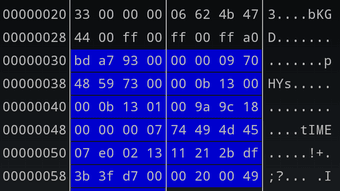
HEX EditorIntro: HEX Editor is a compact Android utility for inspecting and changing binary files directly on a phone or tablet. It suits developers, repair technicians, and curious users who need to examine bytes, locate text, or make targeted edits away from a desktop. The app can keep several files open, display values in hexadecimal, decimal, or octal form, and search strings across multiple encodings. Macros, a built-in terminal, file comparison, and configurable interface options support more involved workflows. Its focused toolset turns quick binary checks and repeatable edits into a portable process.
TextEditIntro: TextEdit is a lightweight Android writing tool for quick notes and simple plain-text documents. It gives students, developers, and everyday users a clean space to jot ideas, keep short logs, or draft text without the overhead of a full document suite. The editor keeps common controls close to the writing canvas, while Open and Save actions make it practical for small text files such as logs and notes. Its focused layout suits short writing sessions when you want an uncomplicated place to capture, edit, and revisit plain text.