Smart Launcher 6Intro: Smart Launcher 6 is an Android home-screen replacement for people who want their apps, information, and shortcuts arranged around the way they use a phone. It sorts apps into categories, brings search, contacts, web queries, calculations, and common actions into one place, and keeps weather, calendar, music, notes, photos, and battery information close through widgets. Wallpaper-aware colors, fonts, icon packs, stickers, gestures, and one-handed placement make the layout easy to shape. RSS feeds add a reading layer, while privacy controls can keep selected apps out of view. It turns everyday navigation into a more deliberate routine.
Rootless LauncherIntro: Rootless Launcher is an Android product for people who want to use a Pixel-style home screen with app drawers, search, icons, and launcher customization. It is designed for users who want a familiar Android launcher experience without changing system root access, with a focused mobile experience that can be explored in short sessions or configured for regular use. Its value comes from keeping the main workflow close to the device, whether that means quick access, information, creativity, social connection, or interactive play. Before relying on optional features, users should review compatibility, permissions, account choices, storage, data use, and any commercial terms that apply to their setup.
Projectivy LauncherIntro: Projectivy Launcher is an Android product for people who want to organize a TV-style home screen, launch apps, and tailor a living-room Android interface. It is designed for Android TV and media-device users who want a focused launcher layout, with a focused mobile experience that can be explored in short sessions or configured for regular use. Its value comes from keeping the main workflow close to the device, whether that means quick access, information, creativity, social connection, or interactive play. Before relying on optional features, users should review compatibility, permissions, account choices, storage, data use, and any commercial terms that apply to their setup.
One LauncherIntro: One Launcher is an Android home-screen replacement for users who want a brighter, more iOS-inspired way to organize everyday apps. It places a search bar and app shortcuts on a clean workspace, then spreads additional apps across swipeable pages and named folders. Quick-access icons for tools, settings, browsing, and phone functions keep common tasks close at hand. The launcher also supports colorful wallpapers, widgets, transition effects, and a battery-focused utility layer, giving older Android devices a lighter, more personalized starting point.
Nova LauncherIntro: Nova Launcher is an Android home-screen replacement for people who want more control over how their phones look and behave. It lets you arrange app icons, widgets, folders, pages, and the app drawer around the way you work, play, or communicate. You can fine-tune grid spacing, icon shapes, colors, light or dark themes, and search access, then save a setup for later restoration. Optional Prime tools add gestures, hidden apps, drawer groups, and notification badges. The result is a more personal, flexible starting point for everyday Android navigation.
Nougat LauncherIntro: Nougat Launcher is a home-screen replacement for Android users who want the visual character of Android 7.0 without changing the rest of their phone. Set it as the default home, place everyday apps on a familiar grid, and move through the drawer with a chosen layout or quick search. Theme and icon-pack support, drawer colors, gesture controls, widgets, hidden apps, and desktop locking add room to tune the interface. The launcher keeps useful shortcuts close at hand, making it a practical choice for people who enjoy a classic Nougat look with flexible controls.
Niagara LauncherIntro: Niagara Launcher is a minimalist Android home-screen replacement for people who want everyday apps within easy reach without a crowded grid. Choose a short list of favorites for the starting screen, move through the rest of your app library with the Wave Alphabet, and use search or gestures when a task sits outside the main list. Themes, wallpapers, icons, fonts, widgets, notification tools, and screen-time reminders let you shape the launcher around your routine. It offers a calmer, more deliberate way to use Android while keeping useful shortcuts close.
Mint LauncherIntro: Mint Launcher is an Android home-screen app for users who want a cleaner, more personal way to reach their apps. It lets you reshape the home-screen layout, resize icons, use third-party icon artwork, and choose from multiple transition effects. Swiping up opens an organized app drawer where apps can be categorized, grouped, moved, or uninstalled in batches, while quick search and smart suggestions reduce time spent browsing. You can also hide selected icons for a less exposed layout. Together, these tools make everyday navigation more flexible, provided the device is supported.
Microsoft LauncherIntro: Microsoft Launcher is an Android home-screen app for people who want more control over how their phone looks and how everyday information is organized. It lets you arrange apps, choose custom icon packs, refresh the wallpaper with a Bing image, and use a dark theme. A personalized feed brings calendar items, to-do lists, and Sticky Notes into one place, while gestures make common actions quicker. Backup and Restore helps preserve a layout locally or in the cloud when changing phones. The result is a more personal, practical starting point for daily tasks.
Launcher 10Intro: Launcher 10 is an Android home-screen replacement for users who miss the clean, tile-based feel of Windows Mobile. It turns the phone's default home into a dark or light start screen where apps can be pinned as colorful tiles, grouped into folders, and combined with widgets. Swiping to All Apps opens a searchable, alphabetized list with recently added entries and hidden-app controls. Tile editing, icon packs, custom backgrounds, transparency, and live information help people shape a familiar daily layout while keeping frequently used apps easy to reach.
iLauncherIntro: iLauncher is an Android home-screen launcher for users who want a clean, iPhone-inspired look without replacing their existing Android apps. It reorganizes the desktop with themed icons, folders, a quick-access bar, search shortcuts, and optional endless scrolling. You can add practical widgets for weather, calendar, photos, battery, clock, and contacts, then adjust the grid and folder view to match your routine. The launcher also includes a lock-screen style with passcode or pattern options, making everyday navigation feel more personal and visually consistent.
GO Launcher ZIntro: GO Launcher Z is an Android home-screen launcher for people who want more control over how their phone looks and works. It replaces the standard home experience with customizable themes, HD wallpapers, icons, widgets, folders, and animated screen transitions. You can arrange apps across pages, use gestures for quicker access, and choose a visual style that fits your routine. The launcher also includes app-management tools and options for organizing the drawer, while its theme and wallpaper collections make it easy to refresh the phone’s appearance without changing the device itself.
Evie LauncherIntro: Evie Launcher is an Android home screen replacement for users who want a simplified launcher, onboarding permissions, storage and wallpaper access, location-based suggestions, contacts integration, and default home app setup. It is aimed at people who want a cleaner launcher experience and are comfortable changing system home behavior. The app opened to permission onboarding, location and contacts prompts, default launcher selection, and Android settings screens. Users should review contacts, location, files and media, microphone, phone, settings changes, notifications, storage, and default home implications before use.
Buzz LauncherIntro: Buzz Launcher is an Android home-screen replacement built around customizable themes and Homepacks. The app lets users shape a complete starting layout with wallpapers, icons, widgets, and transition effects instead of changing only one visual element. Saved designs can be organized or backed up, while the launcher can be selected as the device’s default home app. It is best suited to Android users who enjoy experimenting with visual styles and reorganizing everyday shortcuts, with the note that the original online theme service is no longer available.
Apex Launcher ClassicIntro: Apex Launcher Classic is an Android product for people who want to customize a home screen with app drawers, icons, grids, gestures, and launcher settings. It is designed for users who want traditional Android launcher personalization and layout controls, with a focused mobile experience that can be explored in short sessions or configured for regular use. Its value comes from keeping the main workflow close to the device, whether that means quick access, information, creativity, social connection, or interactive play. Before relying on optional features, users should review compatibility, permissions, account choices, storage, data use, and any commercial terms that apply to their setup.
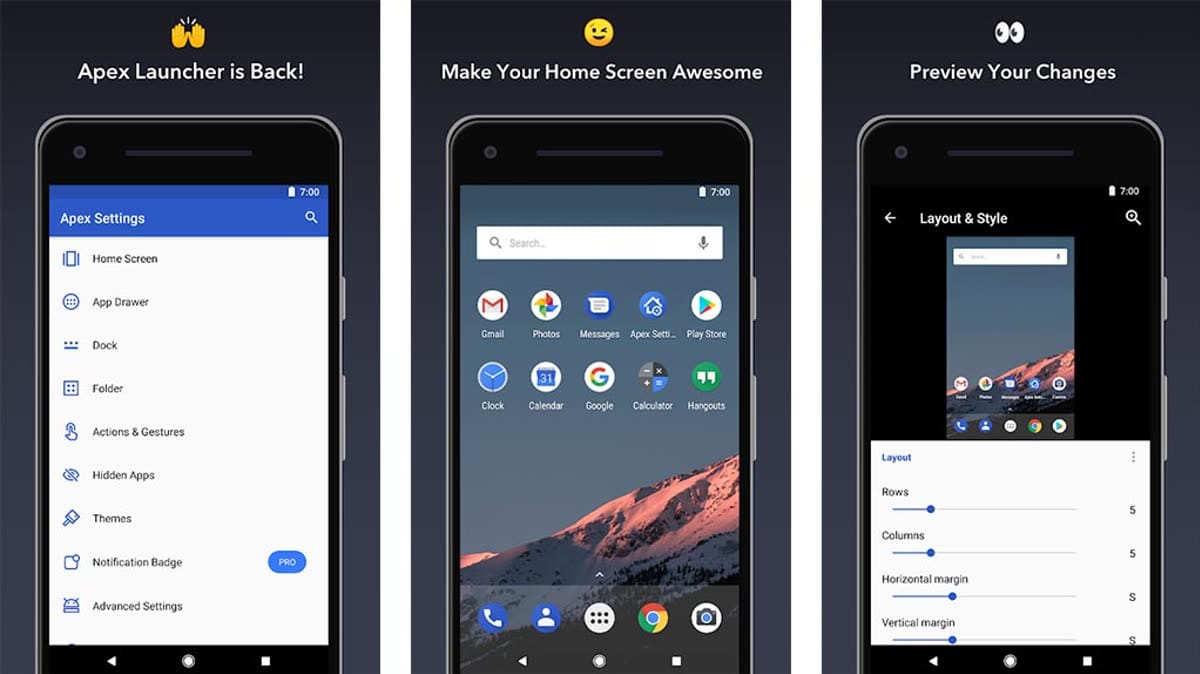
Apex LauncherIntro: Apex Launcher is a home-screen replacement for Android users who want more control over icons, folders, gestures, app drawers, docks, and the layout of their daily launcher. Instead of changing only a wallpaper, it lets users choose a drawer style, organize the desktop, add shortcuts, and make the phone feel more personal without leaving the familiar Android launcher model.
Anime LauncherIntro: Anime Launcher is an Android personalization app that turns the home screen into an anime-themed workspace with interactive comic-style models and movable sprites. It is designed for users who want everyday app access to feel more expressive without giving up launcher controls. You can tap, drag, or zoom the animated elements, then shape the desktop with themes, wallpapers, icon packs, grid settings, folders, drawer styles, and gesture options. Desktop effects, notification badges, and locking controls add practical touches, so routine navigation can carry a distinct anime look while remaining configurable for different habits.
Alpha Hybrid Launcher 4D themeIntro: Alpha Hybrid Launcher 4D theme is an Android personalization app that replaces a conventional home screen with a futuristic circular workspace. It puts frequently used apps around a configurable ring, while Alpha Search helps users find applications, contacts, files, settings, and web results from one entry point. DIY themes, wallpapers, icon packs, fonts, gestures, widgets, and app-lock or hide options let users shape the layout and access style. It suits anyone who wants a distinctive home screen with faster, more visual access to everyday tools.
AIO LauncherIntro: AIO Launcher is a customizable Android home screen that replaces a conventional app grid with a scrollable view of information blocks. It brings widgets for the clock, calendar, weather, notifications, tasks, finance, contacts, and other daily details into one place, while search helps you reach apps, contacts, widgets, and web results quickly. You can rearrange or resize widgets, adjust themes, colors, and text size, and open a side menu for apps and settings. Tasker integration, Lua scripts, and optional AI tools extend the launcher for focused routines and personal workflows.
Action Launcher: Pixel EditionIntro: Action Launcher: Pixel Edition is an Android home-screen replacement for users who want a cleaner Pixel-inspired layout with deeper control over everyday navigation. It lets you adjust the search box, shape the home screen with wallpaper-aware colors, arrange apps in folders, and move through an alphabetical All Apps drawer. Widget Stacks, Shutters, Covers, gestures, icon packs, hidden apps, and notification indicators add quick ways to reach information without opening every app. Import tools and support for phones, phablets, and tablets make it easier to carry a familiar layout across devices.